Table of Contents
We recently moved spatialthoughts.com from WordPress to a static site built with Hugo. The new site is a static site that is deployed with GitHub Actions to GitHub Pages.
This post explains our design choices and how the new site is put together from the data files.

Motivation
Our WordPress site had grown to over 200 pages and nearly 80 blog posts. Most of the pages were about our courses, and that is where the problems were.
Each course existed as three separate sets of hand-maintained pages:
- A course page (
/courses/...) describing the course. - An event page (
/events/...) for registering for each run of the class. - A class page (
/training/...) for each run of the class, with the Zoom details, session recordings and notes for the participants. There were about 140 of these.
The event and class pages were near-duplicates of each other and of the course page. Every new class meant copying a template and replacing placeholders like the session dates by hand, which was the biggest source of errors on the site. The course outline, pre-work and closing links were copied into every class page, so a change as small as a new teaching assistant meant editing dozens of pages. Each class’s status (open for registration, full, finished) was updated by hand in several places, and the list of upcoming classes was edited by hand too.
What we wanted was to write each piece of information once, and have every page that needs it built from that one copy.
AI-first Approach
A migration of this scale is quite a challenging project - and would be an unthinkable undertaking for a single person. We heavily used Claude Code for doing most of the heavy lifting. This enabled us to complete the entire migration and launch the new site within 1 week.
Before any code was written, we started with a plan: a single Markdown document, MIGRATION-PLAN.md, describing what the new site would look like, where it would be hosted, how the private class pages would be protected and the order in which the work would be done. The first draft was written with the AI agent and we refined it over several rounds of review. Each round checked the plan against the facts instead of assumptions: the full WordPress export, a backup of the site’s database and the list of every URL the old site published.
The review changed the plan substantially. The second revision recorded every correction and the reason for it. Hosting moved from Cloudflare Pages to GitHub Pages, which removed a whole category of work. The cohort data model, which became the core of the new site, was added. The riskiest part, encrypting the class pages, was moved to the start so it would be proven on a couple of pages before the bulk of the content was converted. Writing these decisions down meant they could be questioned before any of them was built.
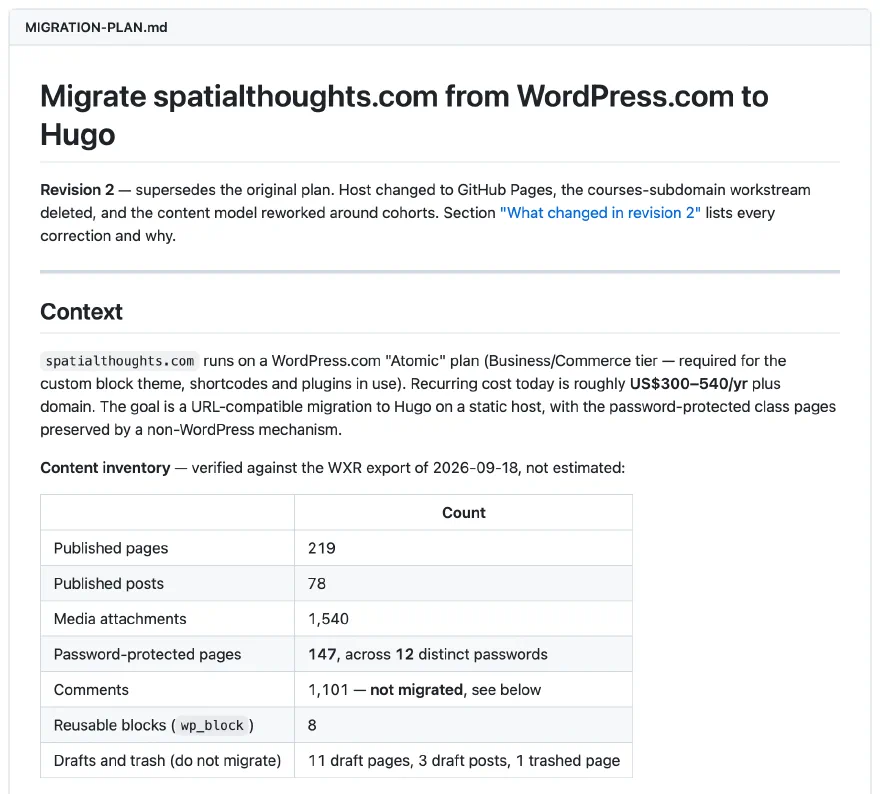
The finished plan was then handed over to the agent for implementation, one phase at a time:
- Phase 0 (Preparation): export the WordPress content, the media library and the certificate records, and check the inventory against them.
- Phase 1 (Skeleton): set up the Hugo site, the data model for courses and cohorts, the page layouts, and an encryption pipeline proven end to end on a few class pages.
- Phase 2 (Content conversion): audit all published URLs and decide which to keep, then convert the course pages, the testimonials, cohorts and their class pages, and all blog posts. A URL parity check, comparing the new site against every URL of the old one, was the acceptance test, since a page can be lost in conversion and the build still succeed.
- Phase 3 (Certificates): move the 1,000 certificate records out of the WordPress plugin into static files.
- Phase 4 (Authoring workflow): rework the tools we used to create class pages and testimonials around the new data files.
- Phase 5 (Redirects and SEO): carry over the redirects from the old site and make sure old links still work.
- Phase 6 (Cutover): point the domain at GitHub Pages. The new site went live on 26 September 2026.
As each phase was implemented, the plan was updated with what was actually done and what was learned along the way, so it became the record of every decision.
The Design: Data Files and Layouts
The new site separates the data from how it is displayed:
content/holds the hand-written pages: blog posts, course pages, and pages like the About page. Each is a Markdown file with structured fields (a course’s level, duration, price, outline) in its front matter.data/holds structured data that has no page of its own, as YAML files. Each run of a class is one file indata/cohorts/, and testimonials, the footer and site-wide settings each have their own file.layouts/holds the templates that turn content and data into HTML. Small reusable pieces (partials) are shared between pages, so the list of upcoming classes looks and behaves the same on the home page, the events page and each course page.
The image below shows how a single course page (Introduction to QGIS) is assembled, with the template that renders each section and where its content comes from. Most of the page comes from the course’s own Markdown file. The date of the next class comes from the cohort files, and the reviews come from the testimonials file, so the same information shows up the same way on every page that uses it.
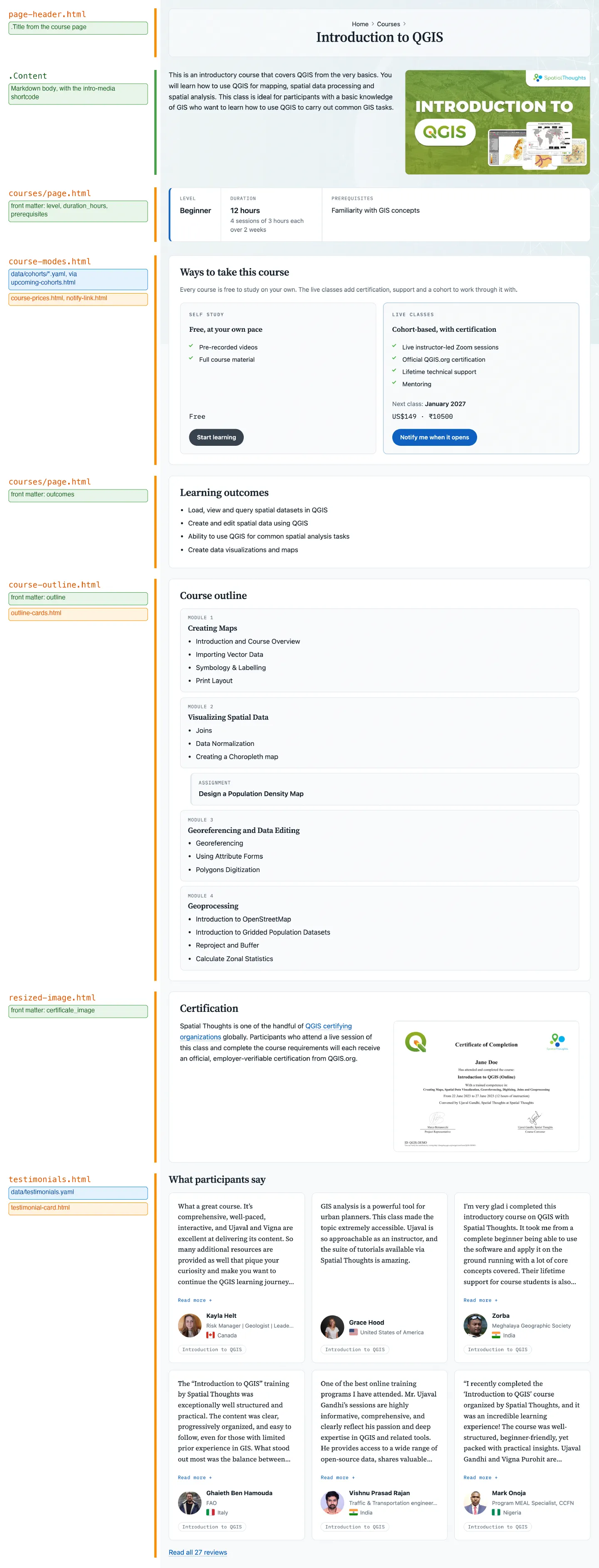
The Introduction to QGIS course page, labelled with the layout behind each section. Orange: templates. Green: the course’s Markdown file. Blue: data files
Hugo’s content adapters generate pages from data at build time. The /events/ and /training/ sections contain no hand-written pages at all. Every event page and class page is generated from the cohort files.
The Cohort Lifecycle
A cohort is one run of a course. Its whole life, from being announced to the class ending, is a series of edits to a single YAML file. A new cohort is created with one script that writes the file with the session dates, price and registration details. Its event page and private class page appear on the next build. From then on, changing the cohort’s status field moves it along.
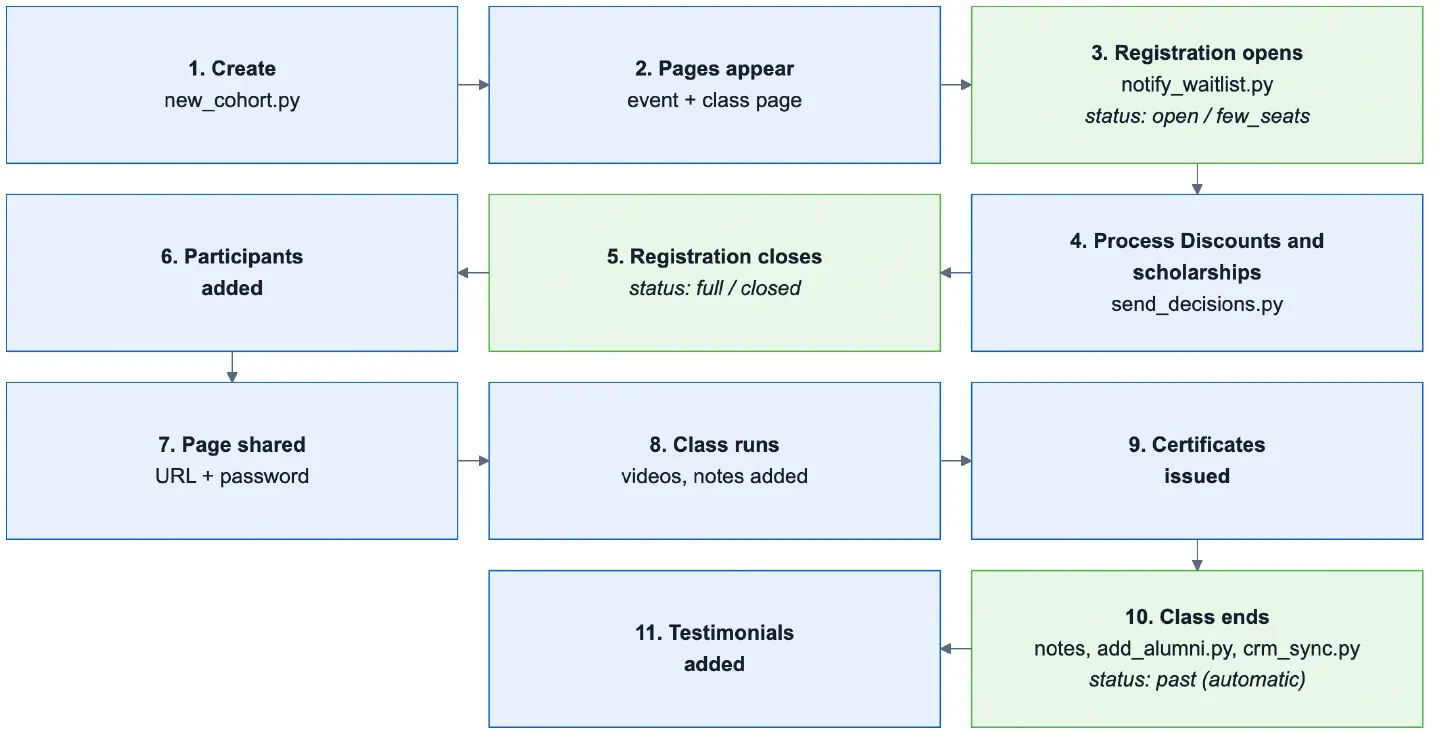
The life of a cohort, from creation to the class ending
Here is what a status change looks like on the site. The screenshot below shows the same class on the Upcoming Classes page in three states. The only thing changed between them is the status: line in its YAML file.
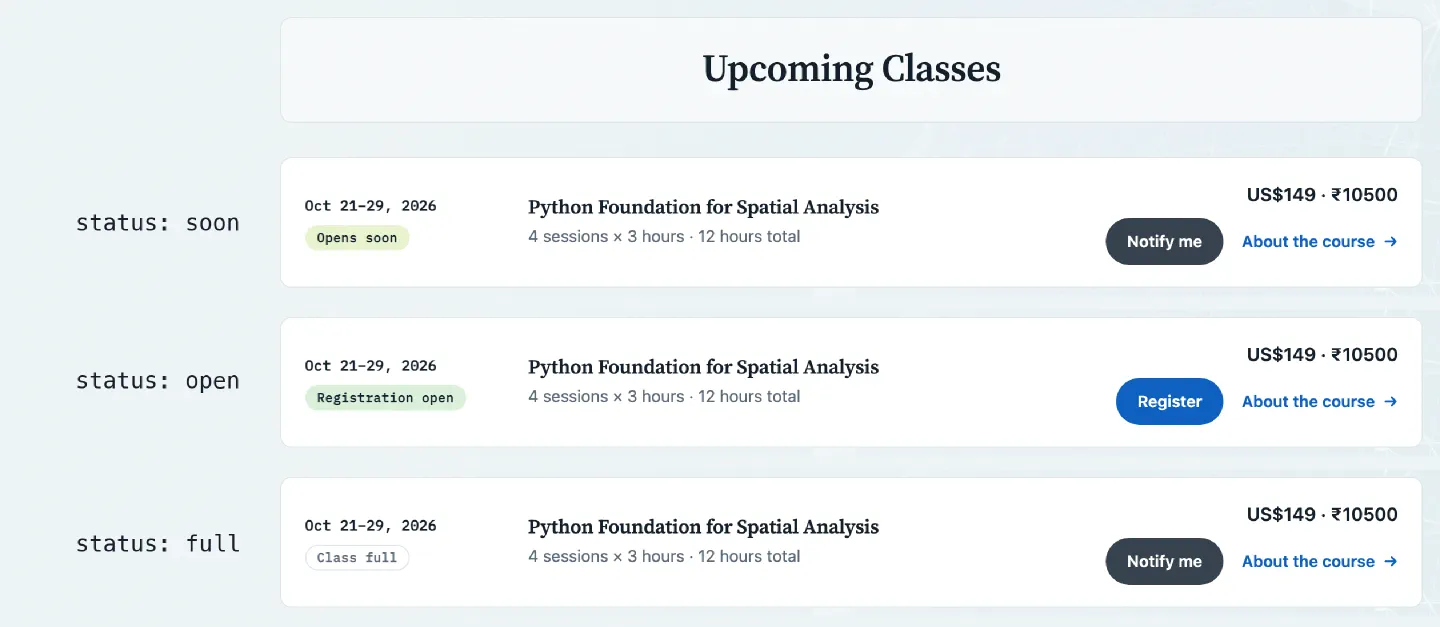
The same class on the Upcoming Classes page as its status changes
- A new class starts as
soon. It is announced with its dates and price, but registration isn’t open yet, so the button invites visitors to sign up to be notified. - Setting the status to
openchanges the label to Registration open and the button to Register. The same change shows up on the home page, the course page and the class’s own event page, which now displays the registration forms. - When the class sells out,
fullkeeps it on the list so visitors can see it, but marks it as Class full and points them to the waitlist for the next one. The registration forms are removed from the event page.
After that, closed takes the class off the upcoming list and moves it to the past classes, and past marks the class as finished once it has run.
All the previous manual steps, like announcing the course to the waitlist, sending emails to participants, issuing certificates, adding participants to mailing lists, adding testimonials, updating the CRM are all handled by python scripts which read the YAML files along with data from Google Forms and Spreadsheets. This automation is enabled by using the Gmail API, Google Forms API, Google Sheets API, Google Drive API, Admin SDK API on Google Cloud.
Creating Private Class Pages
On WordPress, the class pages were password-protected pages. A static site has no server to check a password, and this presented a challenge. Luckily, we found StatiCrypt that is designed to solve exactly this problem. After Hugo renders the site, the build encrypts every class page with the passphrase for its course. The published page contains only the encrypted content and a small form, and is decrypted in the participant’s browser when they enter the passphrase emailed to them before the class.
There is one passphrase per course rather than one per class, so it is easy to share and a past participant can still open the page for their class years later. Every class keeps its page at the same URL forever, and Remember me keeps a participant signed in for 30 days.
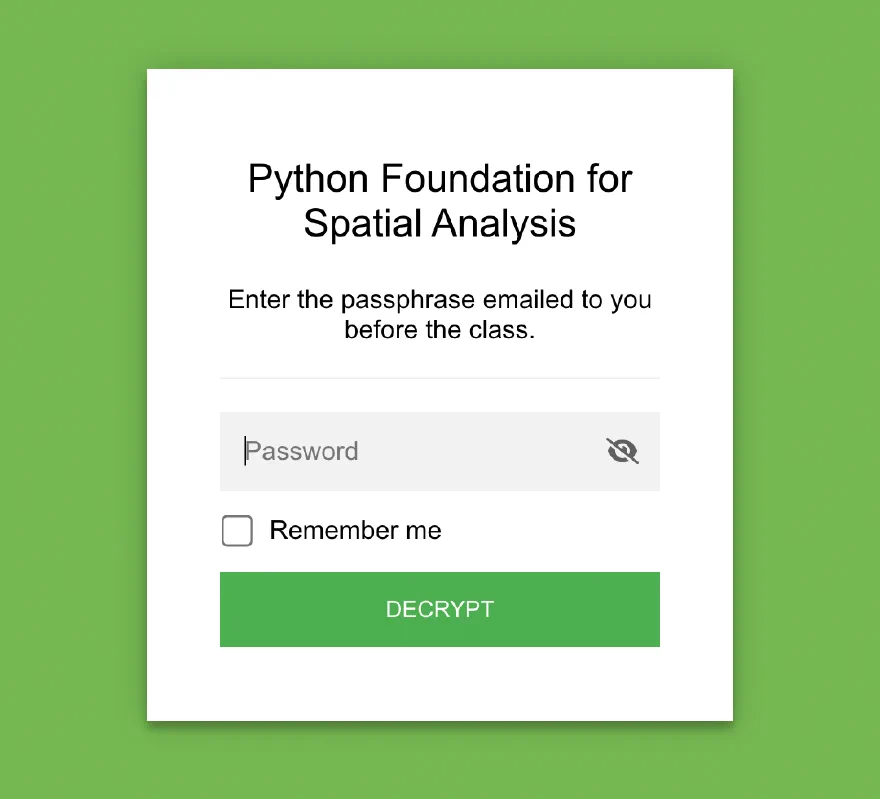
Encryption is the only thing protecting these pages, so the build is careful about it. The class pages are encrypted before anything else reads the generated site, they are kept out of the site search index, and the last step of the build fails if a Zoom link appears anywhere in the published files.
Once unlocked, the class page has everything a participant needs in one place: the Zoom details, the contacts for the instructor and teaching assistant, the schedule with links to check each session in their own time zone, and further down, the installation instructions, session recordings and notes.
Each class page is built from the same YAML file as the rest of the cohort, from the moment the cohort is created. Before registration closes there is no participant list yet, so the page says so.
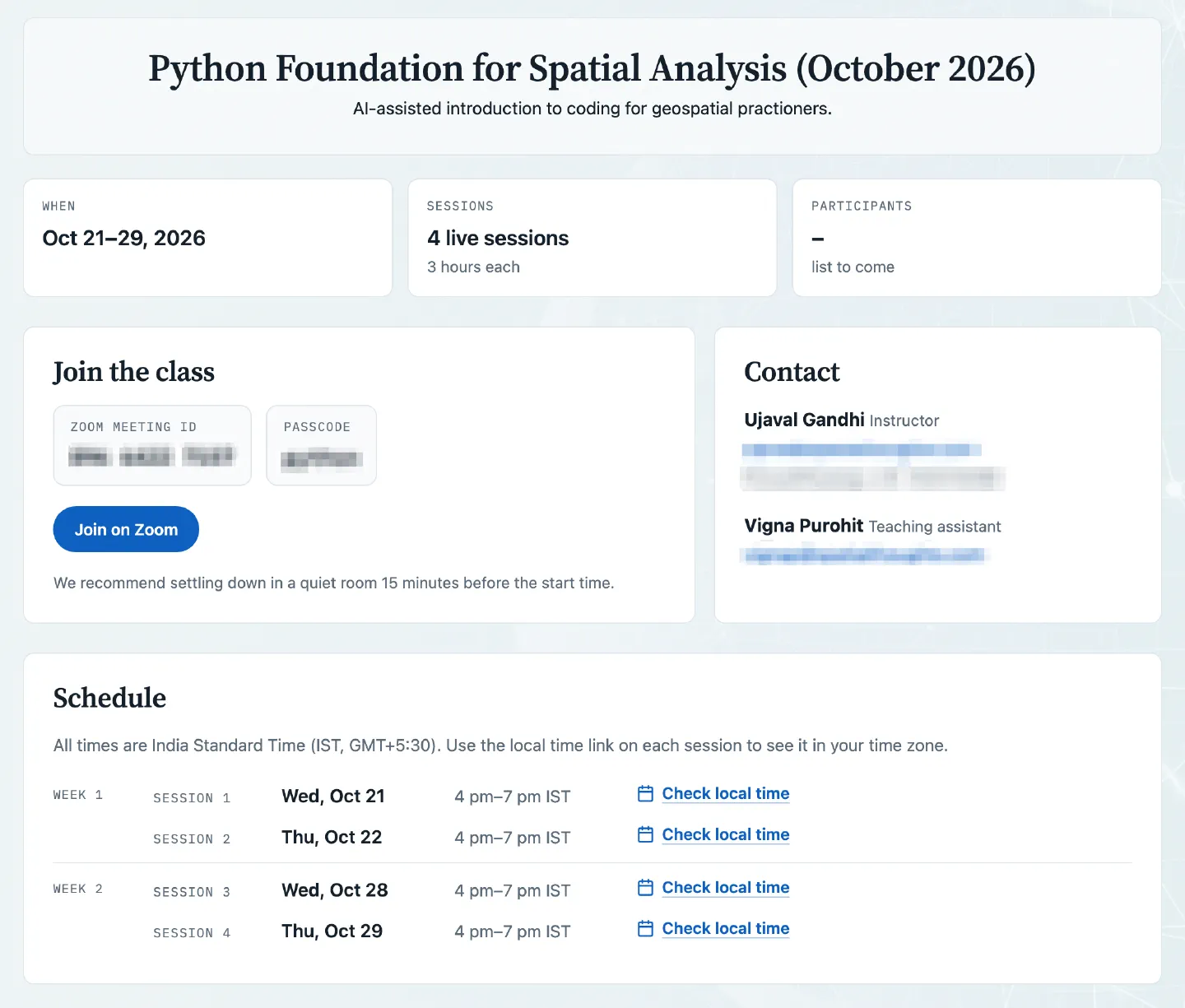
The class page before participants are added
Once registration closes, the participant list is added to the cohort’s YAML file, one entry per person with their name, organisation and country. On the next build the class page shows the count at the top and the full list with country flags further down. Nothing else on the page needs to be edited.
participants:
- name: Asha Rao
  contact: Riverbend University
  country: India
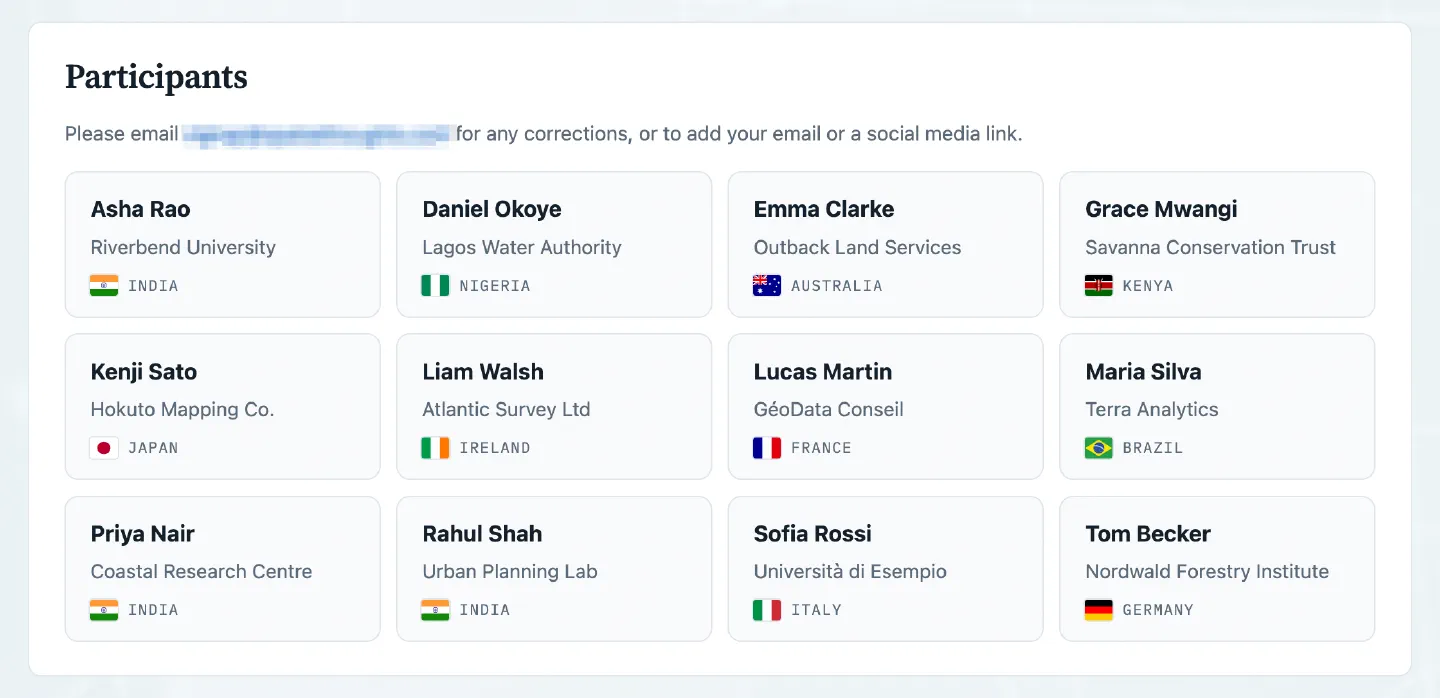
The participant list on the class page, built from the YAML file
The rest of the class page’s content lives in a Markdown file of its own, one per class. When a cohort is created, its file is copied from a template for the course, so it starts with the installation instructions and the assignment form. As the class runs, the session recordings and the links we share in class are added to it as plain Markdown lists:
## Videos

- [Day 1 Recording](https://vimeo.com/...)
- [Day 2 Recording](https://vimeo.com/...)

## Notes

- Regular Expressions [[Cheatsheet](https://medium.com/...)]
- Information video on COG https://www.youtube.com/watch?v=...
A note can be a bare URL. The build gives it a short label based on the site it points to, such as Video, GitHub or Course Material, so the list stays readable without writing a label for every link.
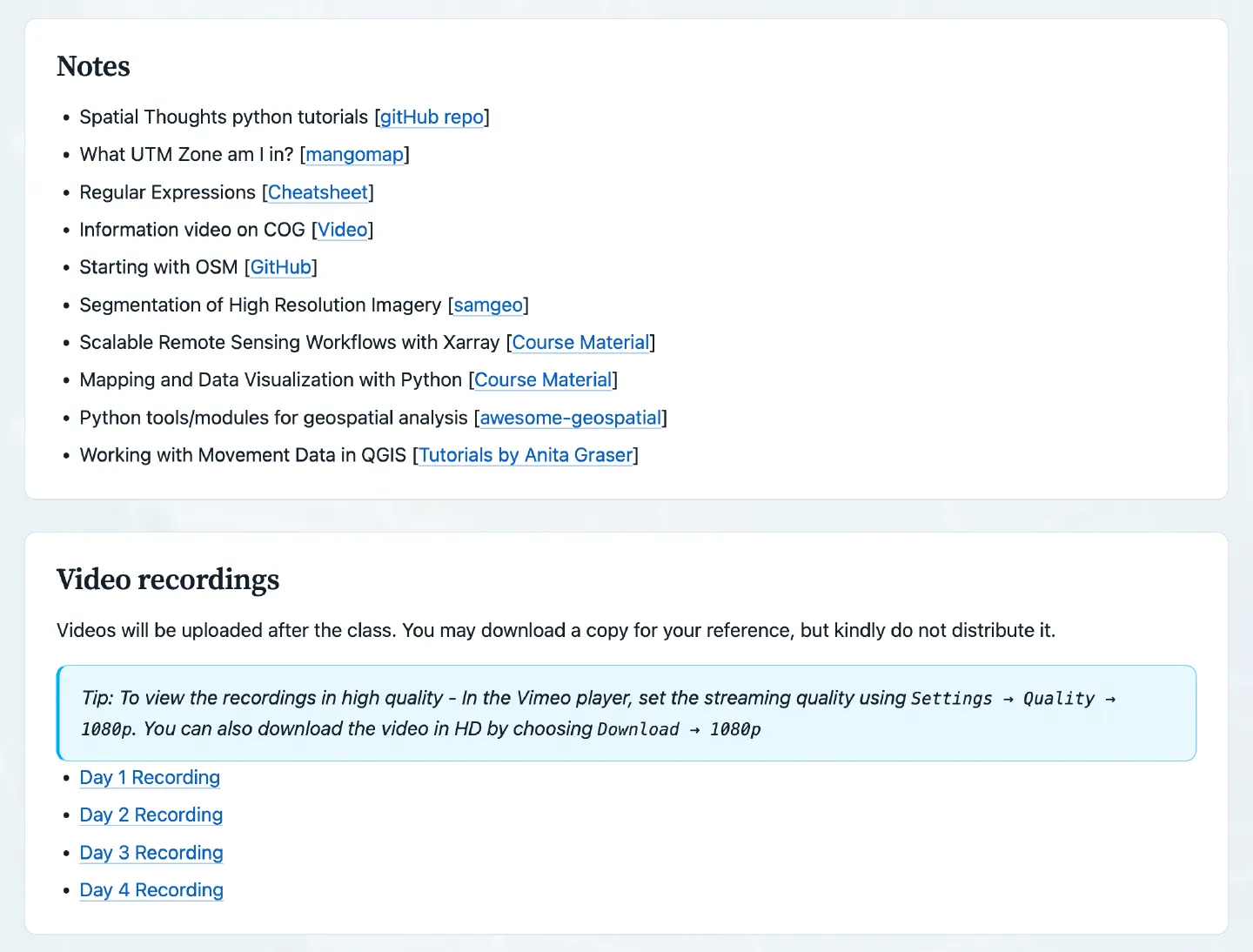
Notes and recordings on a class page, from its Markdown file
Once a class has finished, its file is never edited again, so the page stays exactly as the participants saw it. The notes from every finished class are also collected into a single course notes page grouped by course and topic.
Certificate Verification
Every certificate we issue has an ID printed on it, and anyone, such as an employer, can check it on our certificate verification page. On WordPress this needed a database: the records of over 1,000 certificates lived in the Participants Database plugin, which looked up each ID on the server. On the new site it is just static files. Each certificate is a small JSON file, and the verification page fetches the file for the ID entered and shows the record.
There is no single file listing every certificate. Each record’s filename is a hash of its certificate ID, so a certificate can be looked up only by someone who has its ID. One added benefit of this is that every certificate gets its own page, such as /verify/ST-PYTHON-9999/, so a link to a certificate can be shared directly. These pages are left out of the sitemap and site search, and are marked so that search engines don’t index them.
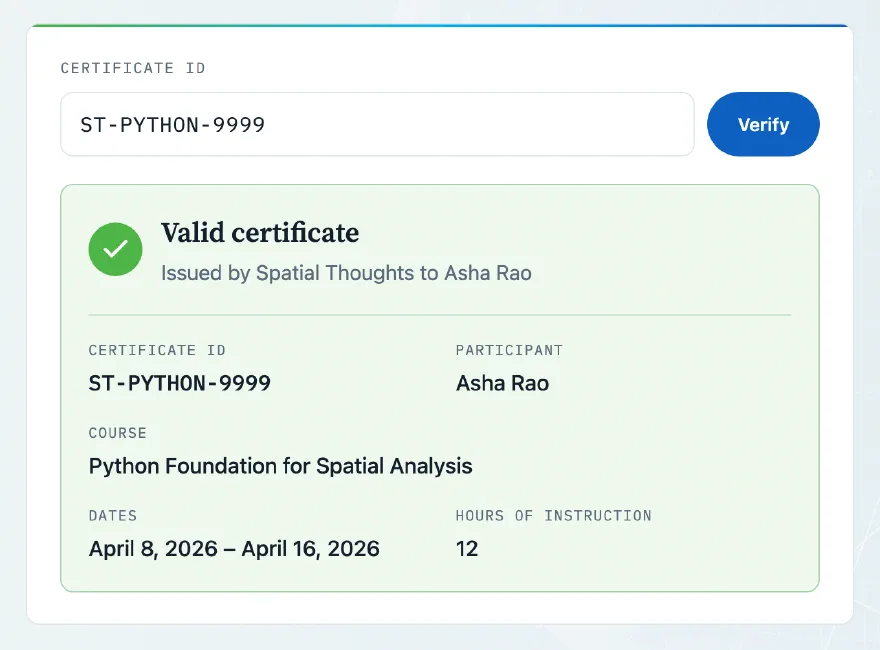
To add new certificates to the site, we have a script that reads from a spreadsheet and adds the required files to the site. Once the files are committed, the new certificates can be verified as soon as the site is deployed.
Hosting with GitHub Pages and Actions
The site is hosted on GitHub Pages, which serves static sites for free. Our courses website has been running on GitHub Pages for years, so we already knew it could handle our traffic. The repository holding the site’s source is private, since the cohort files contain Zoom details and participant lists. GitHub Pages can publish from a private repository on a paid GitHub Pro account, which we already had.
There is no manual build or upload step. Every push to the main branch starts a GitHub Actions workflow that builds the site from scratch and deploys it. A change is live a few minutes after it is pushed. The build runs these steps, in this order:
- Validate the data files, so a typo in a cohort or course fails the build instead of producing a wrong page.
- Render the site with Hugo, generating every course, event, class and certificate page from the content and data files.
- Encrypt the private class pages with StatiCrypt. The course passphrases are stored as a GitHub secret, never in the repository.
- Check that no Zoom link or other private detail appears anywhere in the published files, and fail the build if one does.
Final Thoughts
Moving off WordPress cut our hosting costs and gave us more flexibility on the design. But most importantly - the new website streamlines the backend process for managing our cohorts and reduces manual work needed to keep everything in sync. If you are thinking about building such websites - it is easier than ever. Working on this project expanded my understanding of what is possible to implement as a static site. From password-protected pages to having a certificate validation service - modern engines like Hugo allowed us to build such dynamic data-driven sites as just a collection of static pages.
Comments