Table of Contents
Historically, the open-source spatial analysis workflows lived in different silos
- Python: You use Pandas, GeoPandas, and Jupyter Notebooks.
- SQL: You use SQL with PostGIS.
If you lived in the Python ecosystem, you rarely have to switch to SQL for analysis and vice versa. Many people, including me, had little motivation to sharpen their SQL skills when you could get away with doing things in Python. Many of our students who wanted to learn SQL, found themselves choosing between these two stacks and found SQL had a much higher friction to get started.
Recently, I have been using DuckDB and find that it is the perfect bridge between these two ecosystems. DuckDB + Python + LLMs provide the easiest and most rewarding pathway for Python users to learn and incorporate SQL in their workflows.
In this post, we will cover the following topics
- What is DuckDB?
- Using DuckDB to learn SQL with the help of LLMs
- Example Workflow with LLMs
- Querying and Loading Administrative Boundaries from GeoBoundaries
- Advanced Workflows
- Extracting Overture Maps Data
- Extracting Farm Boundaries from Global Fields of The World (FTW)
What is DuckDB?
DuckDB is a modern high-performance database that has become an essential tool for working with large cloud-hosted datasets. Even though technically it is a ‘database’ - a better mental model for it is to think of it as a ‘database engine’ that can be used to work with structured data using SQL. It comes with a built-in spatial extension that supports geospatial data processing.
DuckDB is the perfect tool to learn and use SQL for Geospatial Python users because:
- Zero-setup. No server or configuration. Install it like a standard Python package.
- Processes local or cloud datasets directly. No copying or loading data.
- Query results can be loaded as a Pandas DataFrame - making it easy to plug it into data science workflows.
- Fast processing of cloud-hosted GeoParquet files. Ability to query the very large datasets in seconds.
- Complements your QGIS and Python workflows rather than replacing them.
Using DuckDB to Learn SQL
You can use DuckDB in your Python environment (Jupyter Notebooks, Google Colab, etc.) by just installing the duckdb Python package. You don’t need to run a server or load data. DuckDB queries your data from wherever it is located - on your computer or a remote location. You can run SQL queries directly on your files.
DuckDB works with all spatial and non-spatial data formats, but it excels with data stored in the Parquet format. Find yourself some Parquet files and practice building and running SQL queries to analyze the data. LLM AI Assistants are very good with SQL. Take help from your favorite AI Assistant to build and understand SQL queries.
Example Workflow with LLMs: Querying and Loading Administrative Boundaries from GeoBoundaries
You can start a new chat session with a prompt like the one below.
I am learning SQL. I am using DuckDB Python to run queries against GeoParquet files. I will ask questions and you can give me SQL queries with a detailed explanation. The code should run SQL agaist the file and display the results as a Pandas DataFrame.
FieldMaps provides open datasets of global administrative boundaries from multiple providers. We will query the Admin3 boundaries from GeoBoundaries in the GeoParquet format. The source data is a 2 GB .parquet file containing 100,000+ polygons. Instead of downloading this, we can query it and extract just the subset we require.
parquet_url = 'https://data.fieldmaps.io/edge-matched/open/intl/adm3_polygons.parquet'
DuckDB supports standard SQL syntax for querying. Let’s check some basic information about the dataset.
Prompt: I have a parquet file url in the variable
parquet_url. How do I get the total number of features in the file?
query = f'''
SELECT COUNT(*) FROM read_parquet('{parquet_url}')
'''
result = con.sql(query).df()
result
We can use DESCRIBE clause to get the available columns. We can turn the results of any query to a DataFrame using the .df().
Prompt: How to know what colmns are present in the data?
query = f'''
    DESCRIBE SELECT * FROM read_parquet('{parquet_url}')
'''
columns = con.sql(query).df()
columns
We can load the results directly to a Pandas DataFrame.
Prompt: I want to see first 10 features.
query = f'''
SELECT * FROM read_parquet('{parquet_url}') LIMIT 10
'''
result = con.sql(query).df()
result
We can now form a query to find all features in a specific country. The adm0_src field uses the 3-digit ISO code for each country. Parquet is a columnar format, so we can speed up our query by loading only the required columns.
Prompt: I want to find all features in a specific country and convert the results to a GeoPandas GeoDataFrame.
Note the ST_AsWKB(geometry) function converts the geometry to the WKB format supported by GeoPandas.
country = 'IND'

query = f'''
SELECT
    adm1_name, adm1_id,
    adm2_name, adm2_id,
    adm3_name, adm3_id,
    ST_AsWKB(geometry) AS geometry
FROM read_parquet('{parquet_url}')
WHERE adm0_src = '{country}'
'''

result = con.sql(query).df()

admin3_gdf = gpd.GeoDataFrame(
    result,
    geometry=gpd.GeoSeries.from_wkb(
        result['geometry'].apply(bytes)
    ),
    crs='EPSG:4326'
)
admin3_gdf
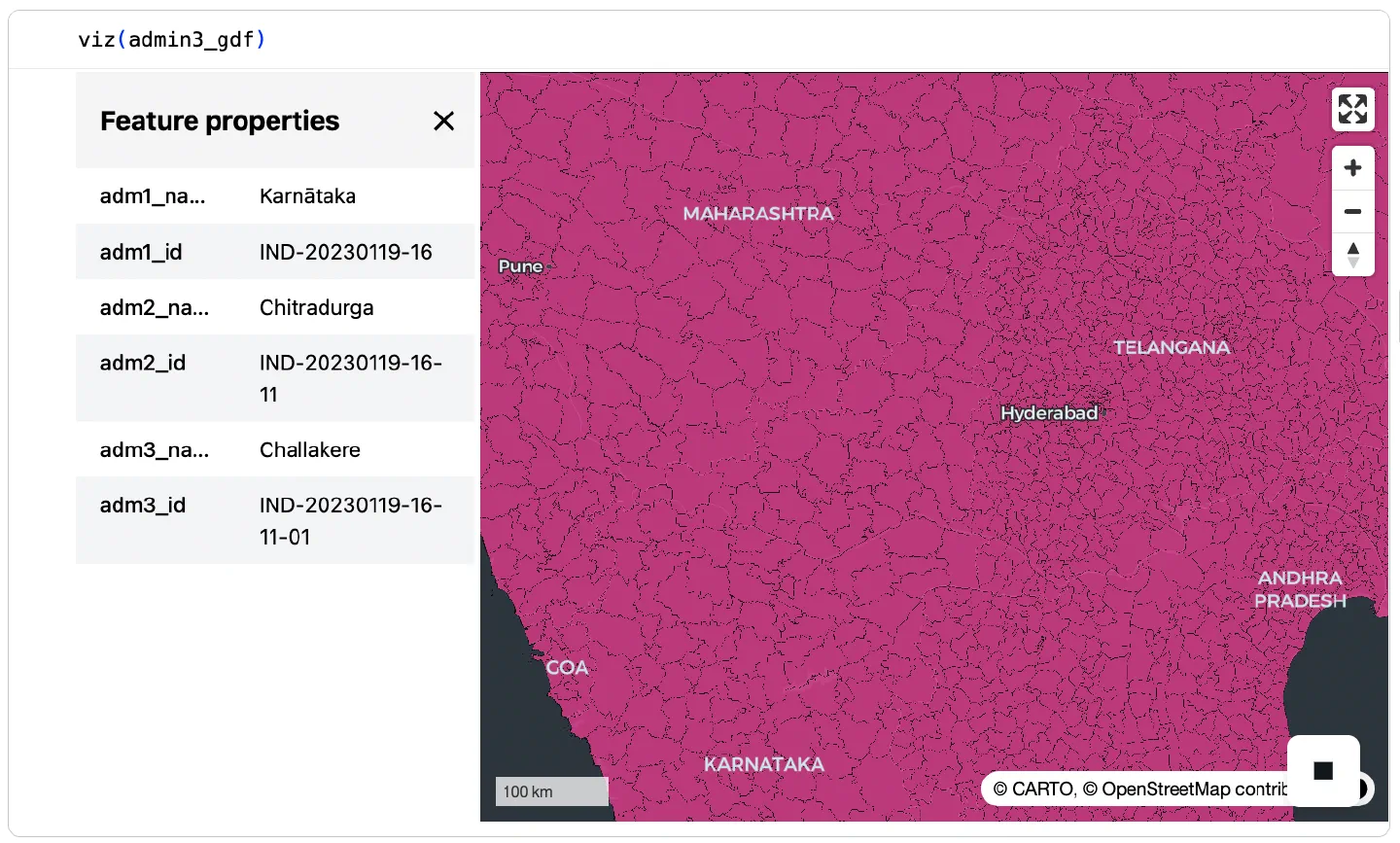
We can use Lonboard to visualize the results on an interactive map. Lonboard can visualize millions of vertices easily and provides an easy way to inspect the results of large queries.
Advanced Workflow: Extracting Overture Maps Data
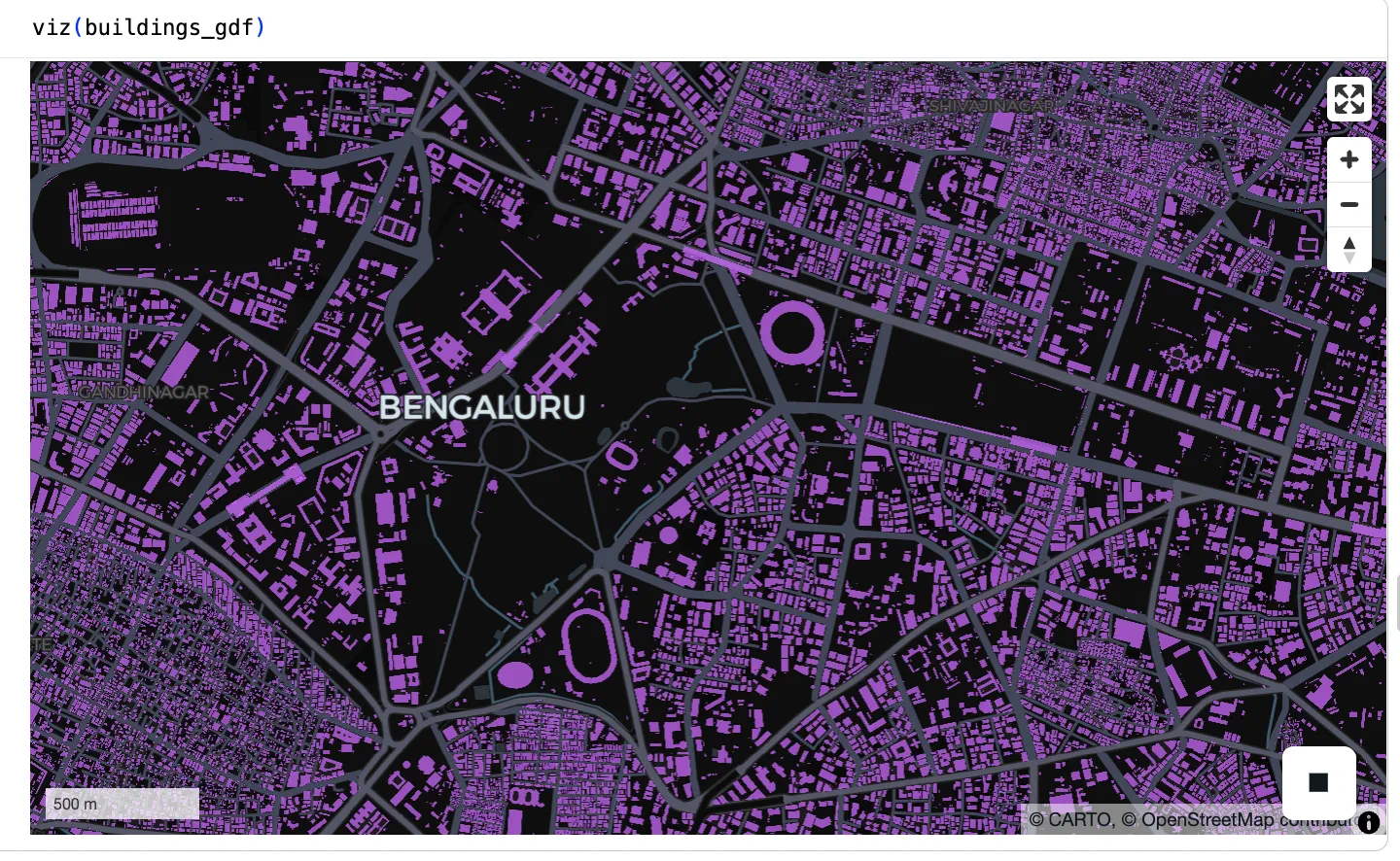
Overture Maps provides free and open map data curated from sources like OpenStreetMap. The entire dataset is available in cloud-native GeoParquet format from the Overture Catalog. The example shows how to extract building footprints for a city. Take help from LLMs to build similar queries for your data of interest - roads, hydrological features, points of interest etc.
We load a GeoJSON file with the municipal boundary for the city of Bengaluru. You can use any other vector data with the polygon for your region of interest.
aoi_gdf = gpd.read_file('https://storage.googleapis.com/spatialthoughts-public-data/bangalore.geojson')
geometry = aoi_gdf.geometry.union_all()
geometry
Overture maps has a monthly release schedule. Find the latest release and query the associated parquet files.
OVERTURE_RELEASE = '2026-04-15.0'

s3_path = (
    f's3://overturemaps-us-west-2/release/{OVERTURE_RELEASE}/'
    'theme=buildings/type=building/*'
)

wkt = geometry.wkt

query = f'''
  SELECT
      id,
      names.primary AS name,
      subtype,
      class,
      height,
      num_floors,
      ST_AsWKB(geometry) AS geometry
  FROM read_parquet(
      '{s3_path}',
      filename=true,
      hive_partitioning=1
  )
  WHERE 1=1
    AND bbox.xmin <= ST_XMax(ST_GeomFromText('{wkt}'))
    AND bbox.xmax >= ST_XMin(ST_GeomFromText('{wkt}'))
    AND bbox.ymin <= ST_YMax(ST_GeomFromText('{wkt}'))
    AND bbox.ymax >= ST_YMin(ST_GeomFromText('{wkt}'))
    AND ST_Intersects(
          geometry,
          ST_GeomFromText('{wkt}')
        )
'''

result = con.sql(query).df()

buildings_gdf = gpd.GeoDataFrame(
    result,
    geometry=gpd.GeoSeries.from_wkb(
        result['geometry'].apply(bytes)
    ),
    crs='EPSG:4326'
)
buildings_gdf
Visualize the resulting GeoDataFrame with 1M+ building polygons interactively using Lonboard.
Advanced Workflow: Extracting Farm Boundaries from Global Fields of The World (FTW)
Taylor Geospatial and Microsoft AI for Good Lab has mapped every field boundary in the world using Sentinel-2 imagery. The resulting dataset is available on Source Cooperative at Global Fields of The World (FTW).
Source Cooperative datasets are hosted on Amazon S3 and require setting some s3 parameters to access their data catalog.
coop_con = duckdb.connect()
coop_con.execute("INSTALL spatial; LOAD spatial;")
coop_con.execute("INSTALL httpfs; LOAD httpfs;")
coop_con.execute("SET s3_endpoint='data.source.coop';")
coop_con.execute("SET s3_url_style='path';")
coop_con.execute("SET s3_region='us-east-1';")
coop_con.execute("SET s3_access_key_id='';")
coop_con.execute("SET s3_secret_access_key='';")
coop_con.execute("SET s3_use_ssl=true;")
Define the path to the source Parquet files.
s3_path = 's3://ftw/global-data/predictions/vectors/alpha/results/*.parquet'
Define a bounding box for the region of interest.
bbox = [80.7113, 26.8823, 80.7714, 26.9130] # North India
#bbox = [76.9791, 12.6984, 77.0391, 12.7319] # South India
#bbox = [73.5893, 22.9578, 73.6494, 22.9894] # West India
#bbox = [-98.1137, 35.6378, -97.8734, 35.7493] # USA
xmin, ymin, xmax, ymax = bbox
Run the query to extract the subset. The dataset has boundaries for multiple years, so we restrict the query to the year 2025.
query = f"""
SELECT
    time, label, bbox,
    ST_AsWKB(geometry) AS geometry
FROM read_parquet('{s3_path}', hive_partitioning=1)
WHERE label = 'field'
  AND struct_extract(bbox, 'xmax') >= {xmin}
  AND struct_extract(bbox, 'xmin') <= {xmax}
  AND struct_extract(bbox, 'ymax') >= {ymin}
  AND struct_extract(bbox, 'ymin') <= {ymax}
  AND time >= '2025-01-01'
  AND time < '2026-01-01'
"""
result = coop_con.sql(query).df()

fields_gdf = gpd.GeoDataFrame(
    result,
    geometry=gpd.GeoSeries.from_wkb(
        result['geometry'].apply(bytes)
    ),
    crs='EPSG:4326'
)
fields_gdf
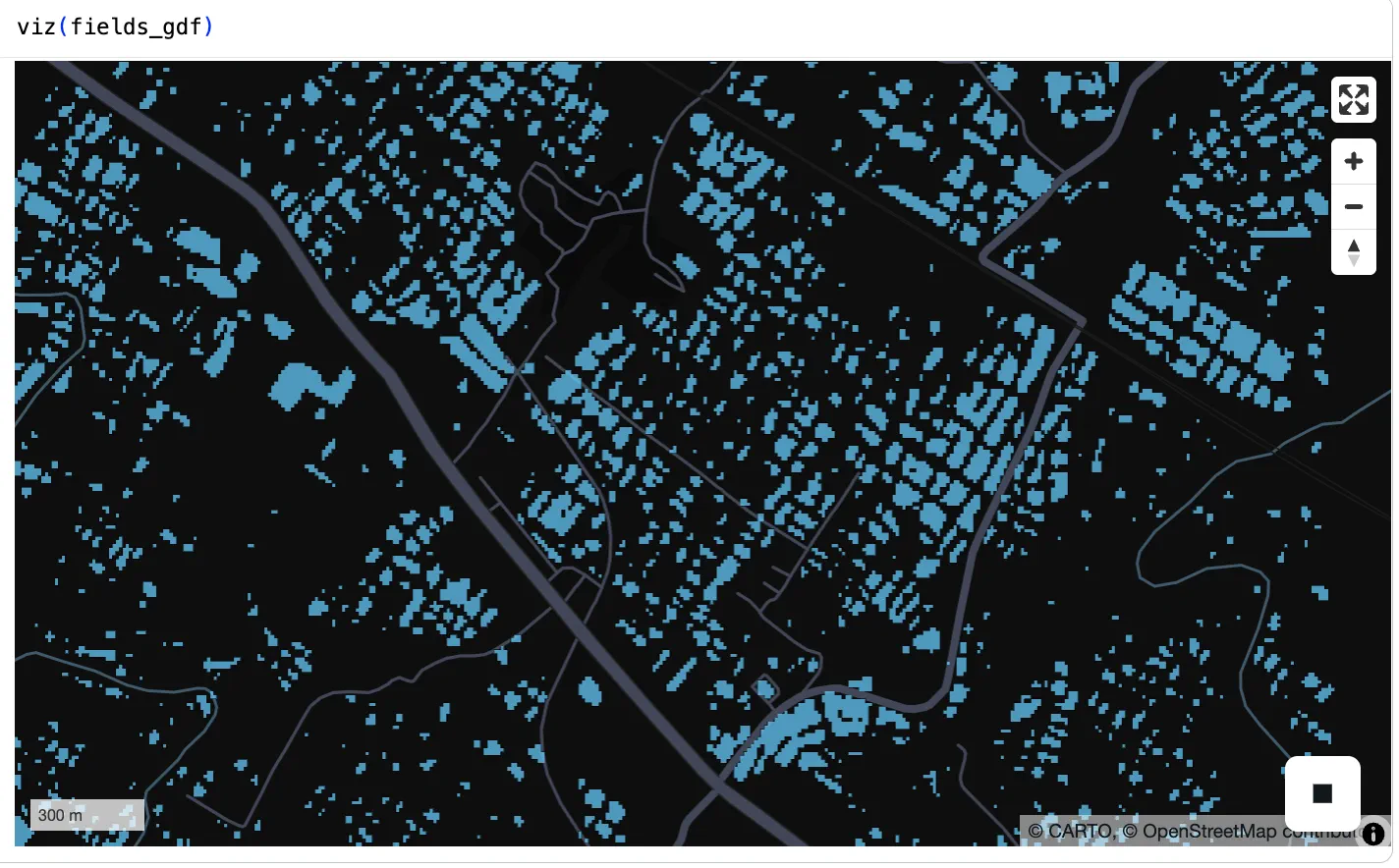
Visualize the field boundaries using Lonboard.
Useful Datasets and Resources
Below are some useful data catalogs and resources to help you learn and use DuckDB in your geospatial workflows.
Catalogs
| Catalog | Coverage |
|---|---|
| Overture Database | Global |
| Source Cooperative | Global |
| GeoMermaids OSM Extracts | North America |
Resources
- Spatial Data Management with DuckDB book by Qiusheng Wu
- 15x Faster Geospatial Pipelines: Why I Swapped Pandas for DuckDB: Example workflow is doing a large join 73M+ FEMA NFIP policy records and 3M+ claims (since 1978) to U.S. county boundaries
- DuckDB for Geospatial: Exploring the 100M places dataset from Foursquare
Comments